Integration between OMniLeads & PBXs
We are going to approach out example using Issabel-PBX, a well known FLOSS project where, besides, every aspect exposed here can be generalized asas a configuration for every IPPBX based on Asterisk.

Note
The steps described on the section are aplicable so the scheme where OMniLeads is in an exclusive host and the IPPBX in other, as where OMniLeads is executedon Docker, living both on the same host in the IPPBX
SIP trunk configuration in the IPPBX
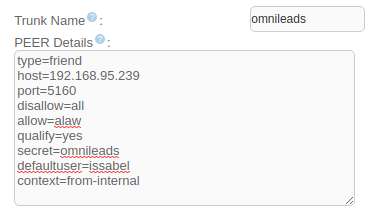
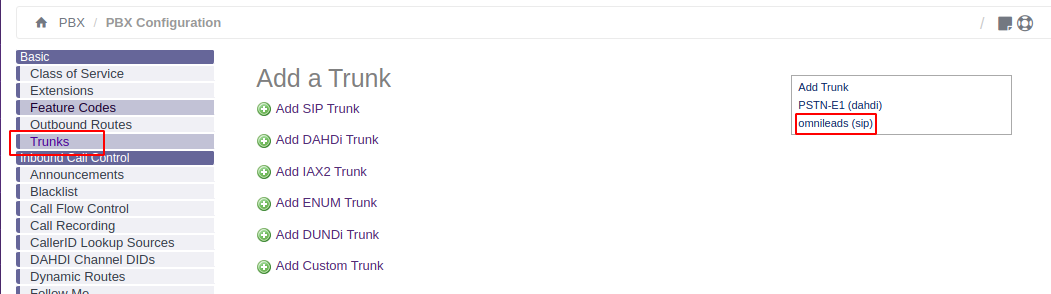
We select the creation of a new SIP trunk y complete the configuration with the following parameters
- In case we have OMniLeads in a Host and the IPPBX in other Host.-
type=friend
host=XXX.XXX.XXX.OML
port=5160
disallow=all
allow=alaw
qualify=yes
secret=omnileads
fromuser=issabel
context=from-internal
- In case of executing OMniLeads with Docker inside of IPPBX base operating system
type=friend
host=XXX.XXX.XXX.PBX
port=5163
disallow=all
allow=alaw
qualify=yes
secret=issabelOML
fromuser=issabel
context=from-internal
Note that the only thing tha changes between both posibilities is the port parameter, between 5160 (OMniLeads in a separate host)and 5163 (OmniLeads dockerized over the same IPPBX host)
Once our SIP trunk is available, we go to check accessibility using the IPPBX Asterisk IPPBX
We establish a bash session inside the host running Issabel and raise the command:
asterisk -rx 'sip show peers'
If all goes well, we should see OK in the output line related to the new SIP trunk, with 5160 or 5163 port

SIP trunk configuration on OMniLeads
Once generated the SIP trunk on IPPBX side, we proced with the generationwith its corresponding part on OMniLeads
- In case we have OMniLeads on a Host and the IPPBX in other host we use the PBX Omnileads (LAN) template.-
type=wizard
transport=trunk-transport
accepts_registrations=no
sends_auth=yes
sends_registrations=no
accepts_auth=yes
endpoint/rtp_symmetric=no
endpoint/force_rport=no
endpoint/rewrite_contact=no
endpoint/timers=yes
aor/qualify_frequency=60
endpoint/allow=alaw,ulaw
endpoint/dtmf_mode=rfc4733
endpoint/context=from-pbx
remote_hosts=XXX.XXX.XXX.PBX:5060
inbound_auth/username=issabel
inbound_auth/password=issabelOML
outbound_auth/username=omnileads
outbound_auth/password=issabelOML
endpoint/from_user=omnileads
- In case of execution of OMniLeas with Docker inside of the IPPBX base operating system, we used the Omnileads inside PBX template.-
type=wizard
transport=trunk-nat-docker-transport
accepts_registrations=no
sends_auth=yes
sends_registrations=no
accepts_auth=yes
endpoint/rtp_symmetric=no
endpoint/force_rport=yes
endpoint/rewrite_contact=yes
endpoint/timers=yes
aor/qualify_frequency=60
endpoint/allow=alaw,ulaw
endpoint/dtmf_mode=rfc4733
endpoint/context=from-pbx
remote_hosts=XXX.XXX.XXX.PBX:5060
inbound_auth/username=issabel
inbound_auth/password=issabelOML
outbound_auth/username=omnileads
outbound_auth/password=issabelOML
endpoint/from_user=omnileads
Once efective our trunk, we pass to check if Issable is accessible from OMniLeads, using OMniLeads Asterisk CLI.
Note
If we are executing OMniLeads in Docker, for access the container executing we must execute the following command: docker exec -it oml-asterisk-prodenv, then we can start the CLI
asterisk -rx 'pjsip show endpoints'
The command output should be similar to the figure:
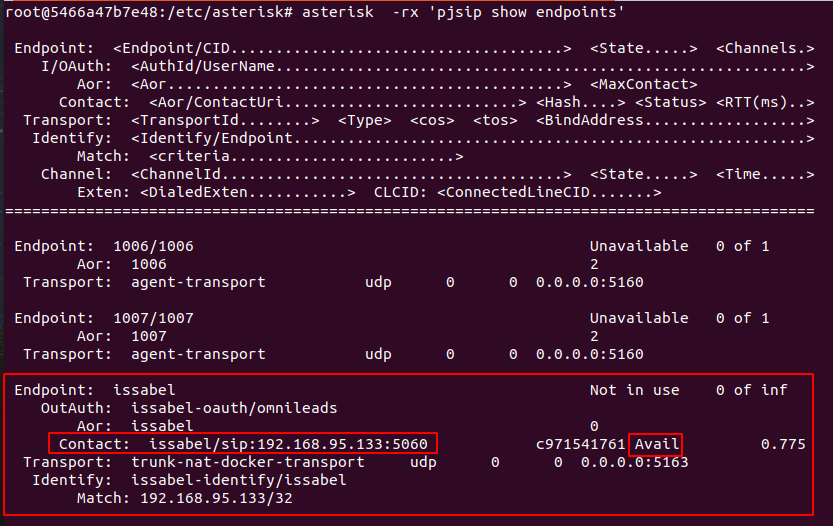
At this point, exists a SIP trunk between bot phone systems, pending the calls routing configuration between both systems
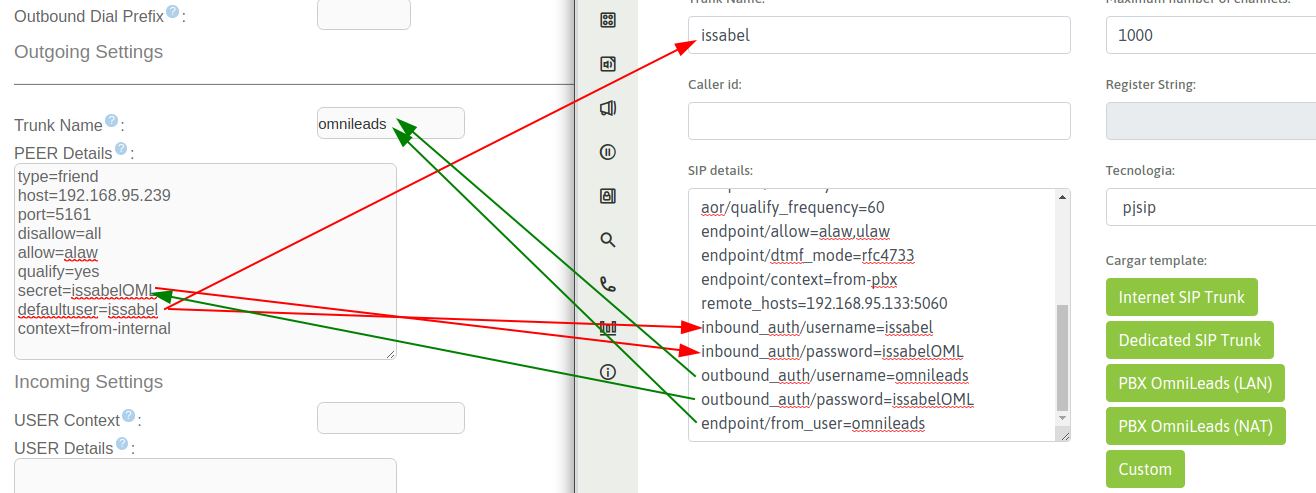
Finally we emphasize on make relations between parameters onIssabel and OMniLeads SIP trunks
A picture is worth a thousand words:
How send calls from IP-PBX to OMniLeads
Now we exposed a way to connect the IP-PBX resources (inbound routes, IVRs, announcements, extensions, etc.) with OMniLeads. It means, that, for example from one option of the company main IVR can derive to an OMniLeads inbound campaing, or that one extension can contact or transfer a call to an OMniLeads inbound campaign or OMniLeads agent.
This is completely viable using the IP-PBX custom extensions, in ourexample case: Issabel-PBX
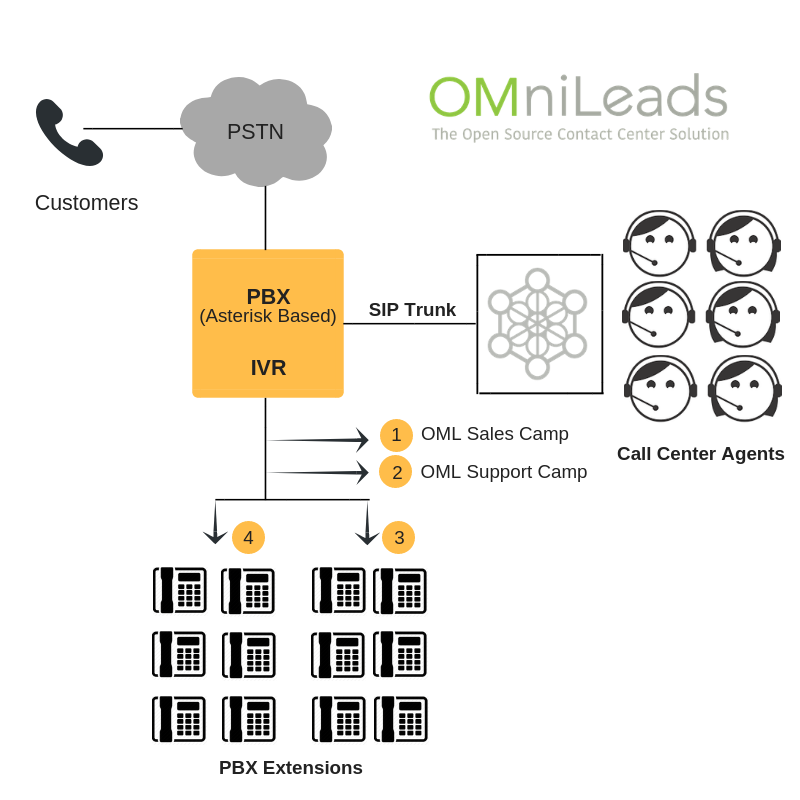
Calls to OMniLeads inbound routes
Now we present the example where the user want to create a custom extension in which, when call it from another extension or invoke it from some PBX object(IVR, inbound route, announcement, etc) create a channel against OMniLeads, particularly pointing to an inbound route which can at the same time, send the call to an inbound campaign.
For one side, we have an inbound route in OMniLeas, pointing for instance, to an inbound campaign:
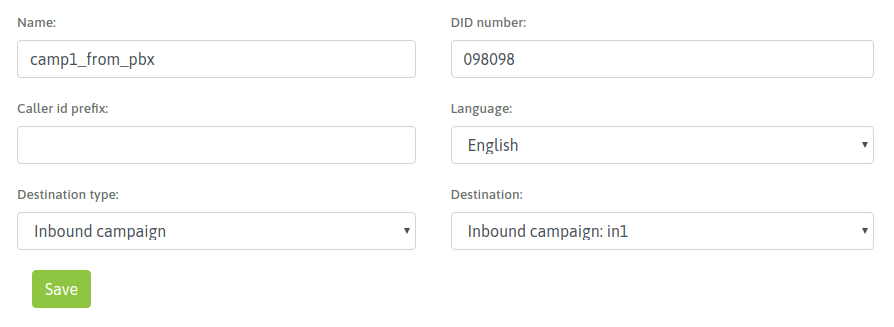
Having in mind that the DID choosen was 098098, in the IPPBX we mustgenerate an extension with type custom, where the Dial stringshould point to the OMniLeads SIP trunk, and the sent number should be 098098.
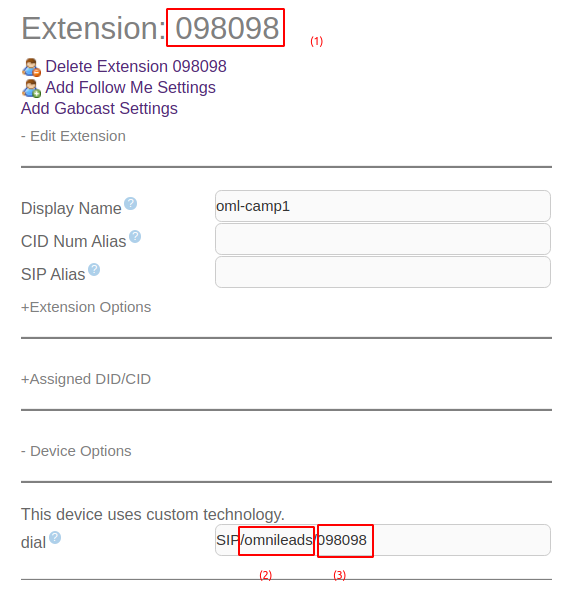
In the figure we mark three elements:
- The extension number, could be different to the number sent to OMniLeads(3) . It can be every numner, only making sure the Dial extension from the custom extension matches with the DID number from the OML inbound route (098098 for our example)
- The trunk where the custom extension points. This values must matches with the field Trunk Name on the SIP trunk against OMniLeads generated on the IP-IPBX
- The number to send by the trunk must match with the DID on the OMniLeads inbound route
This way every IPPBX extension could call o transfer a call to this custom extension and will be sent to the related inbound route on OMniLeads for finally connect over an inbound campaign or the assigned element as destination of the OMniLeads inbound route
As a final mention, we want to make clear that we can have in the IPPBXmany custom extensions pointing to different OMniLeads inbound routesas we like !
Calls to OMniLeads agents
For the case of link an OMniLeads agent on the IPPBX (it means, that from one extension we can call the custom extension and this extension ends linking ina call to an OMniLeads agent), the number to send in Dial string of custom extension will be formed not by a DID of OMniLeads inbound route, but will be a combination ofthe agent ID and its SIP number
Let’s get to the point with this:
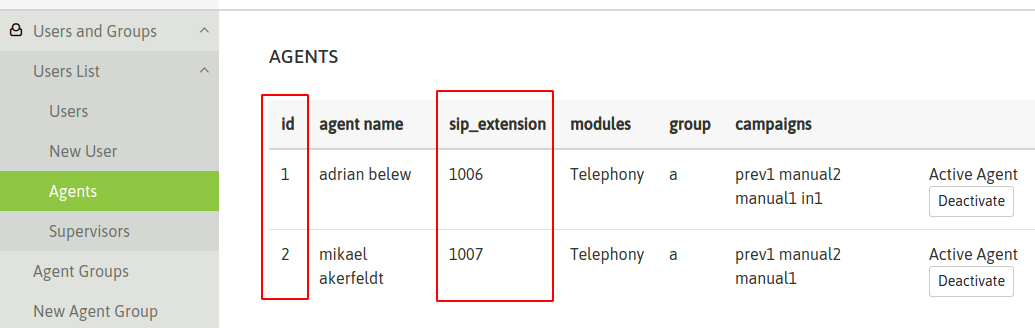
From the figure, let’s take the agent Adrian Belew. Note that its ID is 1 and its SIP number is 1006. For that reason at the momment to make the number to send in the Dial string of the IPPBX custom extension we must concatenate the SIP Number with its Agent ID; in our example will be 10061 for agent Adrian Belew and 10072 for agent Mikael Ackerfeldt
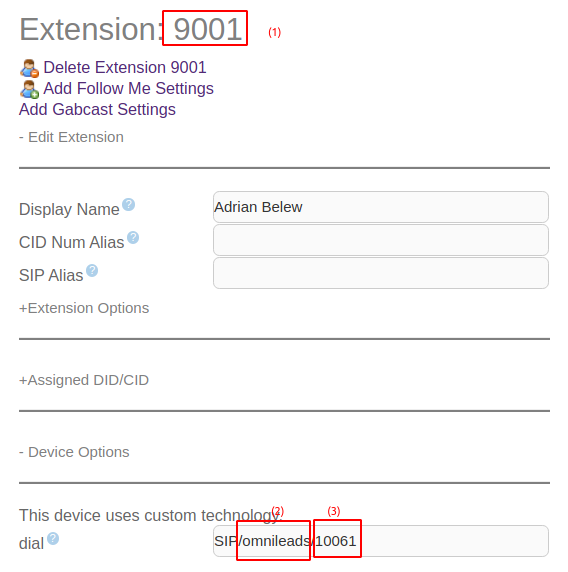
In the figure we mark three elements:
- The extension number, could be different to the number sent to OMniLeads(3) . It can be every numner, only making sure the Dial extension from the custom extension matches with the concatenation of the ID agent and its SIP number (10061 for our example)
- The trunk where the custom extension points. This values must matches with the field Trunk Name on the SIP trunk against OMniLeads generated on the IP-IPBX
- The number to send by the trunk must to match with the concatenation of the ID agent and its SIP number (10061 for our example)
We must to repeat the procedure for every agent for link inside the IPPBX
Calls from OMniLeads to the PSTB and the IPPBX resources
Finally we are going to generate the outboung routing inside OMniLeadsthat allow agents and diales raise calls to the PSTN, and , at the same timeallow agents to call or transfer calls to the IPPBX resources like extensions, ring, groups, queues calls, etc
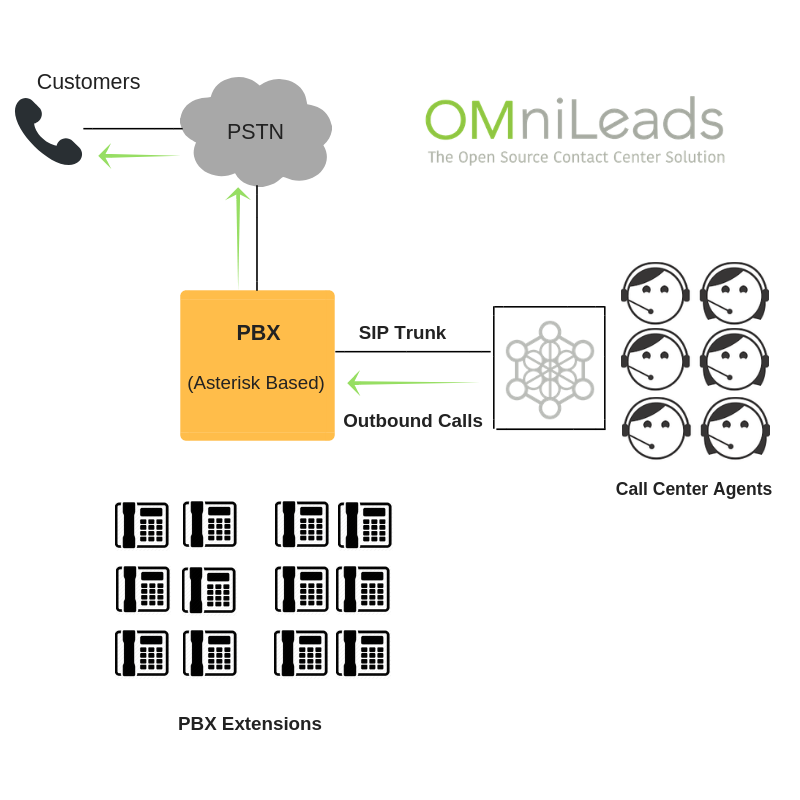

Simply we must add a new outbound route that points to the trunk to the IPPBX
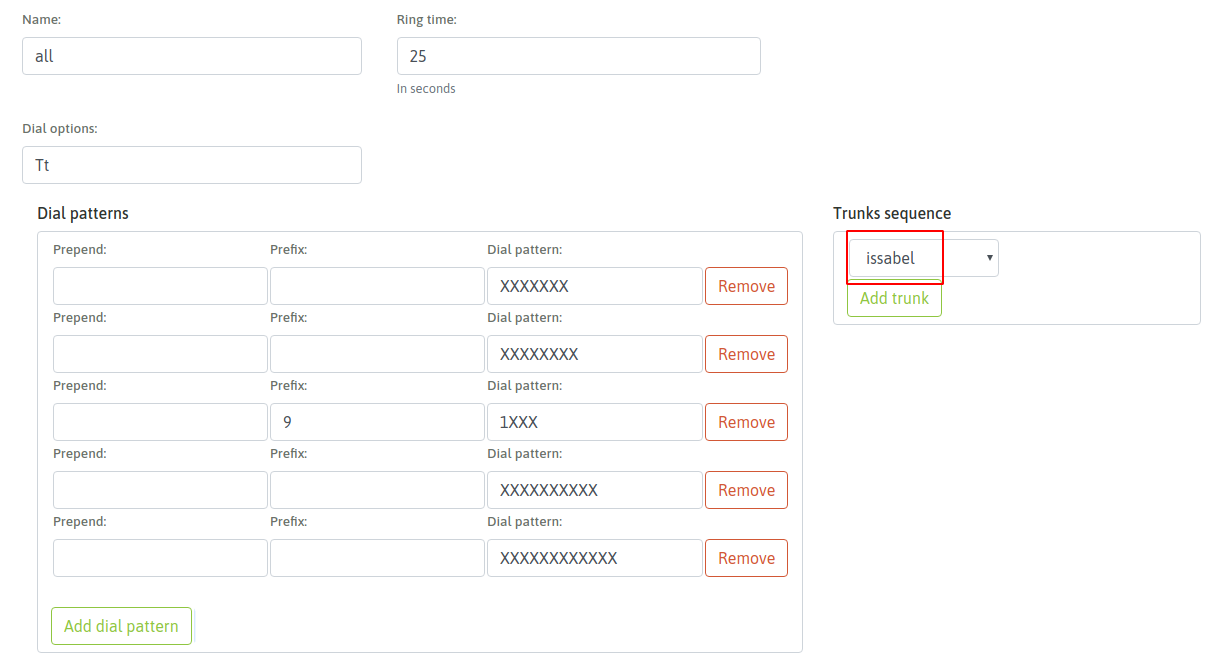
This way the integration is completely functional and both systems can make all types of calls and interactions