OMNILEADS INTRODUCTION
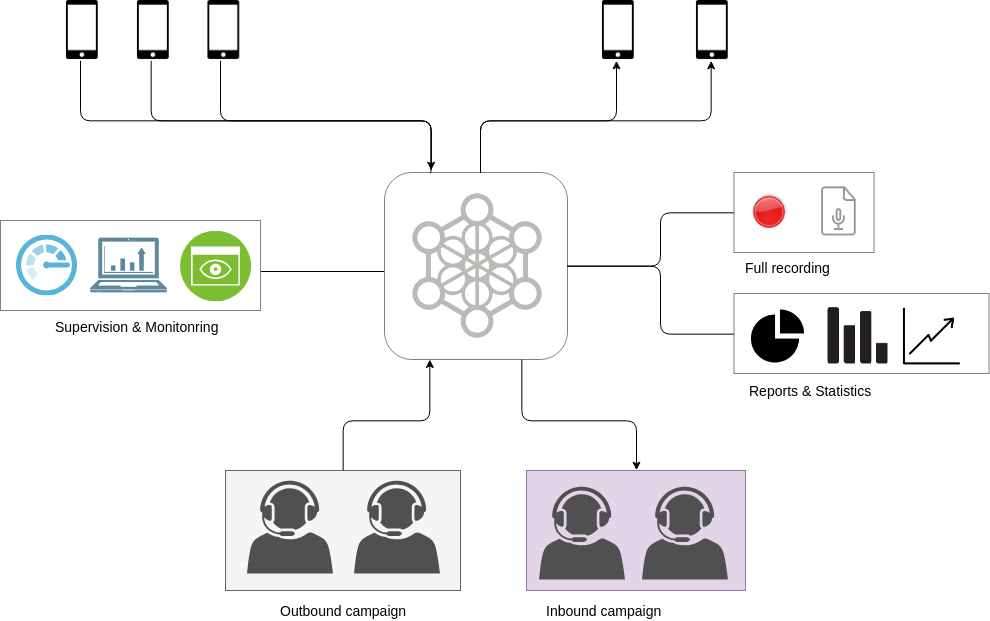
OMniLeads is a GPLV3 licenced software made for Contact Centers. Based on WebRTC , it allows to implement and manage a Contact Center, administering inbound and outbound operations, with access to metrics, reports and indicators, real-time supervision of agents and advanced QA functionalities of contacts and campaigns.
You just need to execute a simple OMniLeads installation, and in a few configuration steps, you will have a functional OMniLeads instance with Contact Center operations of inbound and outbound campaigns.
Our software can be adapted to a company or organization that needs to maintain its own Contact Center with integration to its PBX, also it can work as a “core” of communications to a company that provide Customer Contact (Business Outsourcing Process - BPO) services or it can be installed in VPS or Cloud instances.
OMniLeads is 100% web for the different user profiles: agents, supervisors, administrators, customers, that can access the software from every modern browser with WebRTC support. It doesn’t require the use of desktop applications like softphones. This simplifies to zero the configuration to do in the workstations of agents, that will only have to go to a web URL to be online, managing communications with customers. OMniLeads is a great option to implement CCaaS “Contact Center as a Service” !
How do i get it?
Our repository is available on Gitlab, the software is free for download, install and use
Where can I install it ?
OMniLeads puede correr como una aplicación tradicional desplegando una instalación de todos los componentes sobre un server físico, máquina virtual o VPS. Siempre y cuando se utilice como base GNU/Linux: CentOS minimal 7.7
OMniLeads can also be deployed using Docker containers, with this form the software can be also installed inside an Issabel-PBX or FreePBX instances, having both Contact Center and PBX solutions inside the same host.
How do I install it ?
The section OMniLeads installation talk about this, exposing the steps needed to install the software.
Omnileads’s Features and funtionalities
Where and how can I use it ?
How do I get training?
This documentation take cover of all the facts of this product. From technical instructions oriented to IT administrators to instructions about functionality oriented to supervisors or leaders of the Contact Center.
Also a Free Online Course is available. In this course you can see videos that covers all thematic in this documentation.
To register free go to this link <http://www.techxpert.guru/omnileads-takeoff/>
INSTALLATION
In this chapter is covered all the types of installation of the software
INITIAL SETTINGS
In this section the essential configuration are shown once an instance of OMniLeads is installed
PSTN ACCESS CONFIGURATION
OMniLeads through web configuration, ease the posibility of maintain SIP trunks to access the PSTN. This trunks are invoked by the routing rules of outbound calls, where it can be specified which tye of calls are processed by each SIP trunk. Also, the trunks can be configured in failover mode
To go deeper it’s recommended to read the rest of the chapter.
CAMPAIGNS
The processing of communications between the “outher world” and an OMniLeads’s agent is encapsulated in a campaign. In this chapter all about the management of Inbound and Outbound (manual, preview and dialer) campaigns is covered.
METRICS, REPORTS, RECORDINGS AND SUPERVISION
Inside this chapter, all about the metrics, statistics, reports, recordings and real time supervision, etc.
AGENT MANUAL
In this chapter is covered all the actions that an OMniLeads agent can do inside an operation. Refering to receive/make of calls, dispositions, scheduling, call transfers, and much more.
Integration with PBX
Making a few configurations you can stablish a complete integration between OMniLeads and any PBX. In this section you can see examples of the configuration necessary to integrate the PBX and OMniLeads Contact Center that live together in same host.
IT ADMINISTRATOR MANAGEMENT
In this chapter is covered some tasks made from the IT administrator of OMniLeads. Refering to: configuration of the dialer plattform, upgrade of software management, backup & restore and network parameters change.
CRM INTEGRATION
OMniLeads allows integration with Web CRM systems, allowing to configure the software to send notifications and requests from OMniLeads to the CRM system and vice vers through the system API.
OML API
In this section you will find all the information about the Rest API of the system
- OMniLeads RESTful API
- Login Endpoint
- Endpoint to obtain Contact database structure
- Endpoit to create contact
- Call generator endpoint
- Disposition options list endpoint
- Dispositions list endpoint
- Create new disposition endpoint
- Create new contact and assign it a new disposition endpoint
- Disposition update endpoint
- API de Sesión de Agente en Asterisk