SIP trunk with Internet SIP provider
Se trata del tipo de proveedor de troncales SIP al que se puede acceder a través de nuestra propia conexión a internet, utilizando generalmente la autenticación SIP para el envío de llamadas y la registración como suscriptor.
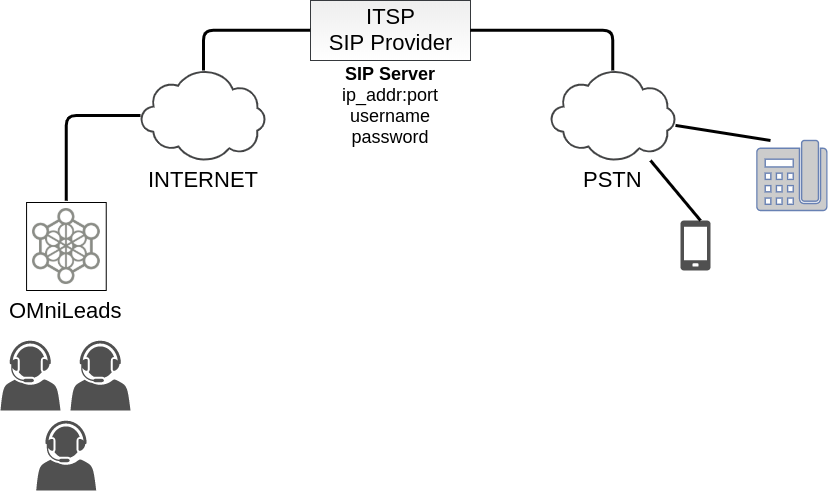
For this scenario see the template PJSIP configuration Wizard which is an example to see.
type=wizard
transport=trunk-nat-transport
accepts_registrations=no
accepts_auth=no
sends_registrations=yes
sends_auth=yes
endpoint/rtp_symmetric=yes
endpoint/force_rport=yes
endpoint/rewrite_contact=yes
endpoint/timers=yes
aor/qualify_frequency=60
endpoint/allow=alaw,ulaw
endpoint/dtmf_mode=rfc4733
endpoint/context=from-pstn
remote_hosts=****IPADDR-or-FQDN:PORT****
endpoint/from_user=****YOUR SIP_USERNAME****
outbound_auth/username=****YOUR SIP_USERNAME****
outbound_auth/password=****YOUR SIP_PASSWORD****
Los últimos cuatro parámetros tienen que ver con los datos que el proveedor nos facilita, esto es; la dirección o FQDN y puerto correspondiente hacia donde debemos disparar nuestros REGISTER o INVITE para registrar el troncal o enviar una llamada saliente y además los valores de username y password con los cuales el proveedor autentica cada REGISTER e INVITE generado desde OMniLeads.
About the other parameters:
- transport=trunk-nat-transport
This parameter indicate to PJSIP that must know the public IP and port needed to send SIP packages.
Los próximos 4 parámetros hacen alusión al hecho de que típicamente bajo este esquema OMniLeads no solicita autenticación al proveedor SIP en caso de las llamadas entrantes, pero si debe autenticarse a la hora de enviar llamadas hacia el proveedor y que además debe enviar un registro recurrente para poder ser localizado por el proveedor SIP a la hora de conectarle llamadas entrantes. Estamos hablando puntualmente de los parámetros y sus valores:
- accepts_registrations=no
- accepts_auth=no
- sends_auth=yes
- sends_registrations=yes
The next three parameters are realted to codecs, DTMF mode and the context:
- endpoint/allow=alaw,ulaw
- endpoint/dtmf_mode=rfc4733
- endpoint/context=from-pstn.
SIP trunk with local SIP backboone
This section is related to connections between SIP providers that are in the same LAN that the OMniLeads is. Tipically in this scenario the provider doesn’t request authentication and NAT is not important.
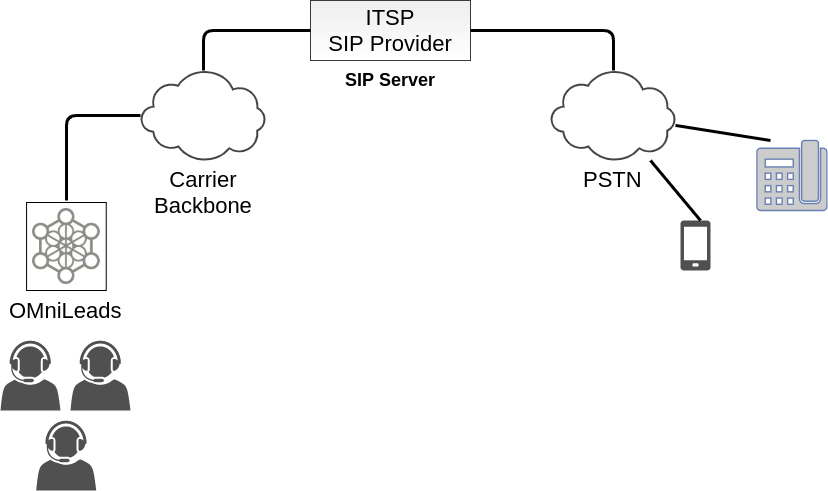
For this scenario see the template PJSIP configuration Wizard which is an example to see.
type=wizard
transport=trunk-transport
accepts_registrations=no
accepts_auth=no
sends_registrations=no
sends_auth=no
endpoint/rtp_symmetric=no
endpoint/force_rport=no
endpoint/rewrite_contact=no
aor/qualify_frequency=60
endpoint/allow=alaw,ulaw
endpoint/dtmf_mode=rfc4733
endpoint/timers=yes
endpoint/language=es
endpoint/context=from-pstn
remote_hosts=****IPADDR-or-FQDN:PORT****
endpoint/from_user=****YOUR SIP_USER****
Where the last two parameters are related: IP/FQDN address and port given by provider to send INVITES for outbound calls and the FROM USER expected. Username and Password is not necessary because there is no authentication requested.
The parameter transport=trunk-transport, is related to the fact that no public IP is needed, because NAT is not important.
The other parameters were mentioned in the section above.
Trunk with a PBX in LAN
This a very common scenario, related to the conection between OMniLeads and the company’s PBX. The access to PSTN is given by the PBX, so the outbound calls are pass through the PBX. For inbound calls the PBX route the calls to OMniLeads, making the appropiate configuration.
Under this configuration the company can deploy OMniLeads in the same machine that operates the PBX.
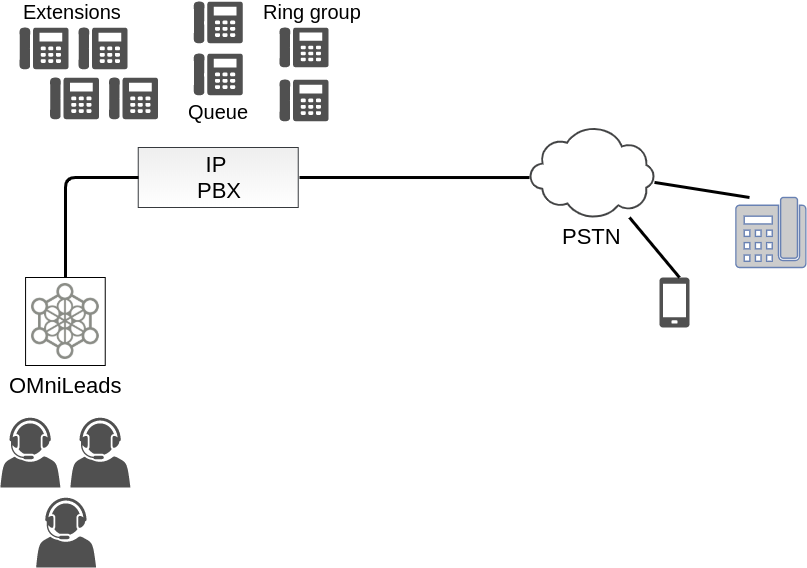
The template `PJSIP configuration Wizard <https://wiki.asterisk.org/wiki/display/AST/PJSIP+Configuration+Wizard>`_that is proposed to complete according to the configuration made in the PBX is:
type=wizard
transport=trunk-transport
accepts_registrations=no
sends_auth=yes
sends_registrations=no
accepts_auth=yes
endpoint/rtp_symmetric=nov
endpoint/force_rport=no
endpoint/rewrite_contact=no
endpoint/timers=yes
aor/qualify_frequency=60
endpoint/allow=alaw,ulaw
endpoint/dtmf_mode=rfc4733
endpoint/context=from-pbx
remote_hosts=****IPADDR-or-FQDN:PORT****
inbound_auth/username=****SIP_USER PBX -> OML****
inbound_auth/password=****SIP_PASS PBX -> OML****
outbound_auth/username=****SIP_USER OML -> PBX****
outbound_auth/password=****SIP_PASS OML -> PBX****
endpoint/from_user=****SIP_USER OML -> PBX****
SIP Authentication is needed for outbound and inbound calls, so, the following parameters are needed:
- sends_auth=yes
- accepts_auth=yes
- remote_hosts=****IPADDR-or-FQDN:PORT****
- inbound_auth/username=****SIP_USER PBX -> OML****
- inbound_auth/password=****SIP_PASS PBX -> OML****
- outbound_auth/username=****SIP_USER OML -> PBX****
- outbound_auth/password=****SIP_PASS OML -> PBX****
- endpoint/from_user=****SIP_USER OML -> PBX****
You can complete the data according to the clear suggestions. No SIP registration is needed but the credentials are sent to authenticate INVITES for outbound and inbound calls.
The parameters transport=trunk-transport and endpoint/force_rport=no are related to the fact that no NAT is neeeded for SIP packages.
Finally the parameter related to context endpoint/context=from-pbx indicates that the calls from the PBX have an access point different that calls from PSTN, because using the context from-pbx you can call and transfer between OMniLeads agents and PBX extensions.
Trunk with a PBX through Internet
This scenario is related to connection between OMniLeads and PBX that are not in same LAN, so the NAT is involved. An example of this is an OMniLeads installed on a VPS and a PBX inside the LAN of company.
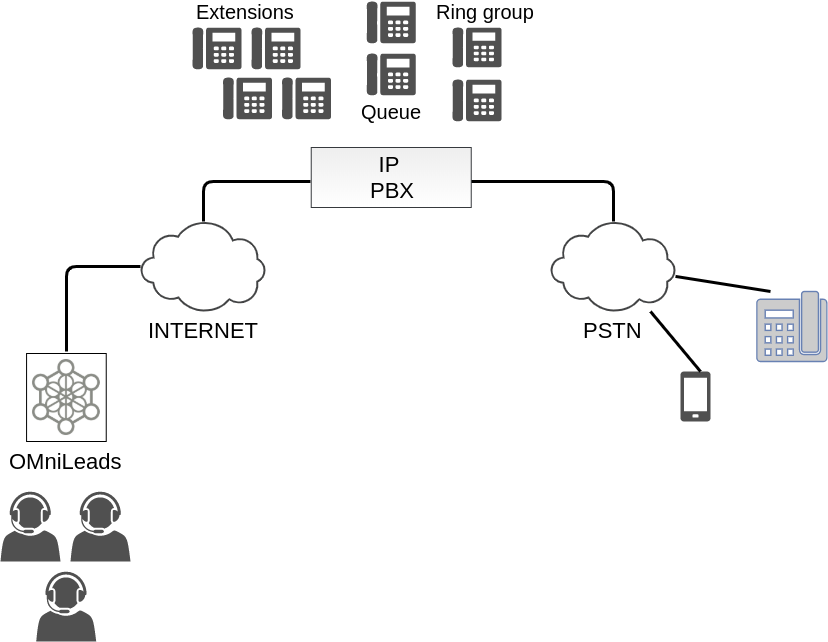
The configuration template change in this parameters:
type=wizard
transport=trunk-nat-transport
accepts_registrations=no
sends_auth=yes
sends_registrations=yes
accepts_auth=yes
endpoint/rtp_symmetric=yes
endpoint/force_rport=yes
endpoint/rewrite_contact=yes
endpoint/timers=yes
aor/qualify_frequency=60
endpoint/allow=alaw,ulaw
endpoint/dtmf_mode=rfc4733
endpoint/context=from-pbx
remote_hosts=****IPADDR-or-FQDN:PORT****
inbound_auth/username=****SIP_USER PBX -> OML****
inbound_auth/password=****SIP_PASS PBX -> OML****
outbound_auth/username=****SIP_USER OML -> PBX****
outbound_auth/password=****SIP_PASS OML -> PBX****
endpoint/from_user=****SIP_USER OML -> PBX****
Registration from OMniLeads to PBX is needed; so the parameter sends_registrations=yes, indicates this. The parameters transport=trunk-nat-transport and endpoint/force_rport=yes indicates that NAT is needed for SIP packages.
The other parameters are similar to previous scenarios.
OMniLeads inside IPPBX
Esta plantilla hace alusión a una instalación OMniLeads over FreePBX / Issabel. Es decir bajo este escenario OMniLeads se encuentra corriendo en el mismo host que el software de IPPBX. Lo cual implica que se establezca un PJSIP trunk desde el Asterisk dockerizado dentro del host y el Asterisk que se ejecuta como servicio a nivel sistema operativo de base de la IPPBX.
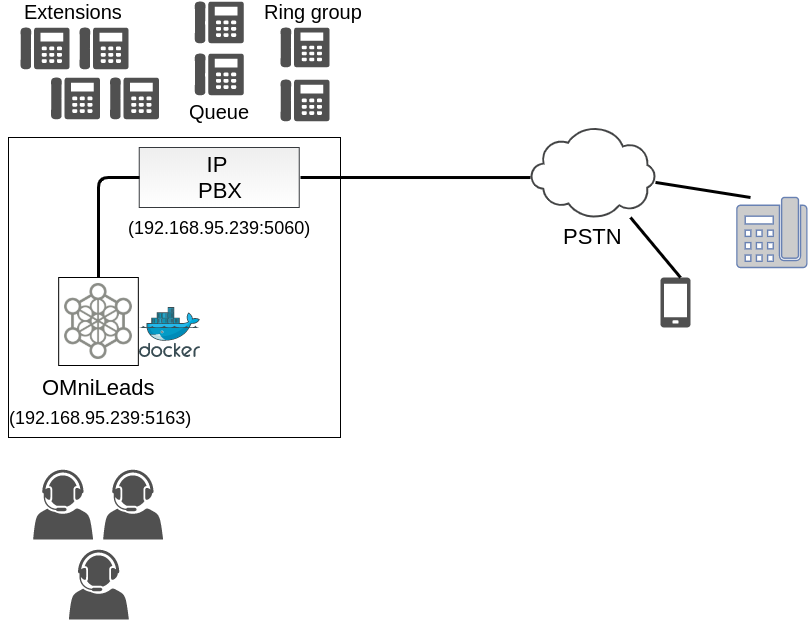
The configuration template change in this parameters:
type=wizard
transport=trunk-nat-docker-transport
accepts_registrations=no
sends_auth=yes
sends_registrations=no
accepts_auth=yes
endpoint/rtp_symmetric=nov
endpoint/force_rport=yes
endpoint/rewrite_contact=yes
endpoint/timers=yes
aor/qualify_frequency=60
endpoint/allow=alaw,ulaw
endpoint/dtmf_mode=rfc4733
endpoint/context=from-pbx
remote_hosts=***IPADDR-or-FQDN:pORT***
inbound_auth/username=***SIP_USER PBX -> OML***
inbound_auth/password=***SIP_PASS PBX -> OML***
outbound_auth/username=***SIP_USER OML -> PBX***
outbound_auth/password=***SIP_PASS OML -> PBX***
endpoint/from_user=***SIP_USER OML -> PBX****
Respecto a los parámetros vamos a observar que se trata de una configuración muy similar al escenario Trunk with a PBX in LAN, solo que al tener el componente Asterisk dockerizado, se realiza un tratamiento de NAT, observar los parámetros trunk-nat-docker-transport y endpoint/force_rport=yes que se encargan de alterar la dirección IP de los paquetes SIP engendrados desde OMniLeads dockerizado para que salgan con la IP del host IPPBX en lugar de hacerlo con la IP dinámica del asterisk Docker.
The other parameters are similar to the previous scenarios.
PJSIP custom trunk
Here the administrator can write its own PJSIP configuration.